Developer Spoke Integration Guide
Everything engineering teams need to authenticate users across portfolio websites using the centralized identity broker. Eliminate upstream social vendor setup entirely and exchange single-use cryptographically signed tickets in under 5 minutes.
1. What You Need to Integrate
The centralized broker completely inverts traditional OAuth overhead. Downstream child sites never touch third-party social provider portals.
What You DO Need (From Tenant Portal)
-
Client ID:
Public client identifier (e.g.
cid_live_example_9918ab) generated in your workspace. -
Client Secret:
Confidential token (e.g.
sec_live_9921ab01...) stored strictly in backend server environment variables. -
Callback URL:
Your site's internal consumption endpoint (e.g.
https://app.example.com/auth/callback) registered in your domain inventory. -
Broker Base URL:
The root gateway domain:
https://noctisid.com.
What You NEVER Need
- ✕ No Google Cloud Console apps: No OAuth consent screen submissions, verification videos, or domain DNS txt records.
-
✕
No Apple Developer accounts: No $99/yr developer memberships, private key
.p8certificates, or Services ID configs. - ✕ No Meta / Facebook review: No company verification, data protection assessments, or Graph API app reviews.
- ✕ No individual callback URLs: Upstream social providers only know the central broker root.
2. Architecture & Authentication Flow
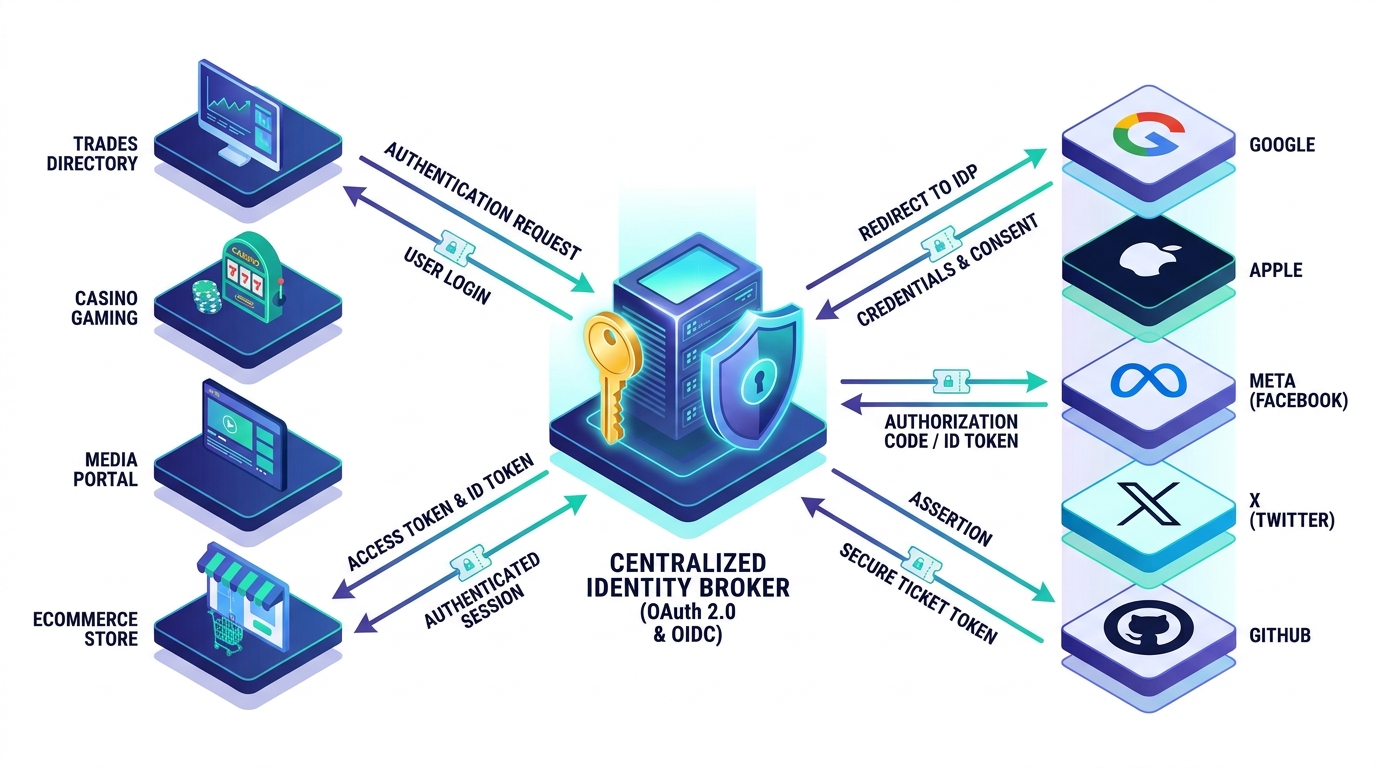
NoctisID operates as an Edge Identity Relay. The client browser never sees upstream client secrets, and the spoke site never touches social provider APIs.
3. The 6-Step Cross-Domain Handshake
Standardized authentication sequence ensuring origin isolation, ticket atomic burn, and CSRF protection.
User Initiates Login on Spoke Site
Frontend (Browser)
The user clicks "Sign In with Google" on your site (e.g. app.example.com). Your frontend redirects the browser to the broker's authorize endpoint with your client_id, desired provider, and a random cryptographic state nonce.
Broker Validates Origin & Proxies to Social Provider
Broker Edge
The broker checks that app.example.com is authorized under tenant tnt_example_corp and that the redirect URI matches. The broker signs an encrypted state token and redirects the browser to the social provider (e.g. Google Accounts).
User Authorizes on Provider Screen
Identity ProviderThe user enters their credentials or selects their account on Google / Apple / Meta. Upon successful login, the provider redirects the user back to the broker's master callback URI.
Broker Issues 60-Second Atomic Ticket
Broker Edge
The broker receives the provider's upstream authorization code, exchanges it for user claims (email, name, provider sub), stores the verified profile in Cloudflare KV with a strict 60-second TTL, and generates a random single-use ticket tkt_.... The user is redirected back to your site:
Spoke Backend Atomically Exchanges Ticket for Claims
Backend Server-to-Server
Your site's server receives the ticket parameter. Crucially, your backend calls the broker's /oauth/token endpoint server-to-server with your secret key. The broker atomically burns the ticket (preventing replay attacks) and returns verified identity claims.
Local User Session Established
Spoke Site BackendYour server creates or retrieves the user record in your local database using the verified email/ID, sets your site's native HTTP-only cookie session (e.g. PHP session, Express cookie), and redirects the user into their account dashboard.
4. Gateway Endpoints Reference
Official HTTP specification for client application integration, token exchange, and discovery.
/oauth/authorize
Entry point for federated authentication. Validates client domain credentials and redirects user to upstream provider.
Query Parameters
| Parameter | Type | Required | Description |
|---|---|---|---|
client_id | String | Yes | Public client ID assigned to your spoke site. |
provider | String | Yes | Target identity provider: google, apple, facebook, x, github, microsoft. |
redirect_uri | URL | Yes | Registered callback URL on your domain where the ticket is returned. |
state | String | Yes | Opaque anti-CSRF token generated by your application and verified on return. |
scope | String | No | Optional permissions (defaults to openid email profile). |
/oauth/token
Atomically exchanges a 60-second single-use ticket for verified user claims. The ticket is immediately invalidated upon receipt.
Request Body (JSON)
Success Response (HTTP 200 OK)
/oauth/userinfo
Returns standard OpenID Connect identity claim assertions for an active bearer access token.
/.well-known/openid-configuration
Machine-readable OpenID Connect discovery metadata, issuer URI, endpoints list, and public JWKS signing keys at /.well-known/jwks.json.
5. Multi-Language SDK & Code Samples
Ready-to-use snippets for your backend stack. Copy, paste, and start authenticating in minutes.
Implement this in your theme's functions.php or custom plugin to handle ticket consumption and log the user in via wp_set_current_user():
<?php
/**
 * NoctisID Spoke Callback Consumer for WordPress / PHP
 */
add_action('init', 'handle_noctisid_callback');

function handle_noctisid_callback() {
    if (!isset($_GET['ticket']) || empty($_GET['ticket'])) {
        return;
    }

    $ticket = sanitize_text_field($_GET['ticket']);
    $client_id = get_option('noctisid_client_id'); // e.g. cid_live_nilegold_7a91bf
    $client_secret = get_option('noctisid_client_secret'); // Store securely!
    $broker_token_url = 'https://noctisid.com/oauth/token';

    // 1. Server-to-Server Ticket Exchange (Atomic Burn)
    $response = wp_remote_post($broker_token_url, [
        'timeout' => 15,
        'headers' => ['Content-Type' => 'application/json'],
        'body'    => json_encode([
            'client_id'     => $client_id,
            'client_secret' => $client_secret,
            'ticket'        => $ticket,
            'grant_type'    => 'ticket_exchange'
        ])
    ]);

    if (is_wp_error($response) || wp_remote_retrieve_response_code($response) !== 200) {
        wp_die('Authentication ticket redemption failed. Please try again.');
    }

    $data = json_decode(wp_remote_retrieve_body($response), true);
    $user_claims = $data['user'];
    $email = sanitize_email($user_claims['email']);

    // 2. Locate or Create Local WordPress User
    $user = get_user_by('email', $email);
    if (!$user) {
        $username = sanitize_user(explode('@', $email)[0]);
        $user_id = wp_create_user($username, wp_generate_password(24), $email);
        wp_update_user([
            'ID'           => $user_id,
            'display_name' => sanitize_text_field($user_claims['name'])
        ]);
        $user = get_user_by('id', $user_id);
    }

    // 3. Set WordPress Session Cookie & Redirect to Dashboard
    wp_set_current_user($user->ID);
    wp_set_auth_cookie($user->ID, true);
    do_action('wp_login', $user->user_login, $user);

    wp_safe_redirect(home_url('/dashboard'));
    exit;
}
Clean Express route handler with fetch or axios:
const express = require('express');
const crypto = require('crypto');
const app = express();

const BROKER_URL = 'https://noctisid.com';
const CLIENT_ID = process.env.NOCTISID_CLIENT_ID;
const CLIENT_SECRET = process.env.NOCTISID_CLIENT_SECRET;

// 1. Initiate Login Redirect
app.get('/auth/login/:provider', (req, res) => {
  const provider = req.params.provider; // e.g. 'google' or 'apple'
  const state = crypto.randomBytes(16).toString('hex');
  req.session.oauth_state = state;

  const authUrl = `${BROKER_URL}/oauth/authorize?client_id=${CLIENT_ID}&provider=${provider}&redirect_uri=https://yourdomain.com/auth/callback&state=${state}`;
  res.redirect(authUrl);
});

// 2. Consume 60s Single-Use Ticket
app.get('/auth/callback', async (req, res) => {
  const { ticket, state } = req.query;

  if (state !== req.session.oauth_state) {
    return res.status(403).send('State nonce mismatch.');
  }

  try {
    const exchangeRes = await fetch(`${BROKER_URL}/oauth/token`, {
      method: 'POST',
      headers: { 'Content-Type': 'application/json' },
      body: JSON.stringify({
        client_id: CLIENT_ID,
        client_secret: CLIENT_SECRET,
        ticket: ticket,
        grant_type: 'ticket_exchange'
      })
    });

    if (!exchangeRes.ok) {
      return res.status(401).send('Ticket redemption rejected or expired.');
    }

    const { user, access_token } = await exchangeRes.json();

    // 3. Establish Local Session
    req.session.user = user;
    res.redirect('/portal/dashboard');
  } catch (err) {
    console.error('Handshake failed:', err);
    res.status(500).send('Internal auth error.');
  }
});
Asynchronous ticket verification using httpx and FastAPI:
from fastapi import FastAPI, HTTPException, Request
from fastapi.responses import RedirectResponse
import httpx
import os

app = FastAPI()
BROKER_URL = "https://noctisid.com"
CLIENT_ID = os.getenv("NOCTISID_CLIENT_ID")
CLIENT_SECRET = os.getenv("NOCTISID_CLIENT_SECRET")

@app.get("/auth/callback")
async def auth_callback(ticket: str, state: str, request: Request):
    # Verify state against session cookie
    if state != request.session.get("oauth_state"):
        raise HTTPException(status_code=403, detail="Invalid state token")

    # Atomic Ticket Redemption
    async with httpx.AsyncClient() as client:
        res = await client.post(
            f"{BROKER_URL}/oauth/token",
            json={
                "client_id": CLIENT_ID,
                "client_secret": CLIENT_SECRET,
                "ticket": ticket,
                "grant_type": "ticket_exchange"
            },
            timeout=10.0
        )

        if res.status_code != 200:
            raise HTTPException(status_code=401, detail="Ticket expired or burned")

        data = res.json()
        user_claims = data["user"]

    # Store authenticated user in session
    request.session["user"] = user_claims
    return RedirectResponse(url="/dashboard", status_code=303)
Add this lightweight JavaScript helper to trigger popups or redirect handshakes on web frontends:
<!-- 1. Include NoctisID SDK -->
<script src="https://noctisid.com/assets/js/sdk.js"
        data-client-id="cid_live_example_9918ab"></script>

<!-- 2. Trigger Social Handshakes with Custom Buttons -->
<button class="btn btn-google" onclick="NoctisID.login('google')">
  Sign in with Google
</button>

<button class="btn btn-apple" onclick="NoctisID.login('apple')">
  Sign in with Apple
</button>

<!-- Optional: Listen for Authentication Events -->
<script>
  window.addEventListener('noctisid:success', (e) => {
    console.log('User authenticated!', e.detail.user);
    window.location.reload();
  });
</script>
Mobile apps must never embed confidential secrets. Use RFC 7636 PKCE with ASWebAuthenticationSession (iOS) or CustomTabsIntent (Android):
// 1. Swift (iOS) — In-App Authentication with PKCE
import AuthenticationServices

class AuthManager: NSObject {
    func startLogin(provider: String) {
        let codeVerifier = generateRandomString(64)
        let codeChallenge = sha256Base64Url(codeVerifier)
        let callbackScheme = "myapp" // Registered Custom URL Scheme

        let authURL = URL(string: "https://noctisid.com/oauth/authorize?" +
            "client_id=cid_live_mobile_app77&" +
            "provider=\(provider)&" +
            "redirect_uri=myapp://oauth/callback&" +
            "code_challenge=\(codeChallenge)&" +
            "code_challenge_method=S256")!

        let session = ASWebAuthenticationSession(url: authURL, callbackURLScheme: callbackScheme) { callbackURL, error in
            guard let callbackURL = callbackURL, error == nil else { return }

            // Extract the 60s single-use ticket
            let components = URLComponents(url: callbackURL, resolvingAgainstBaseURL: false)
            if let ticket = components?.queryItems?.first(where: { $0.name == "ticket" })?.value {
                self.exchangeTicketWithPKCE(ticket: ticket, verifier: codeVerifier)
            }
        }
        session.presentationContextProvider = self
        session.start()
    }
}
6. Mobile & In-App Authentication Architecture
Native iOS, Android, React Native, and Flutter app support with zero client secrets in app binaries.
In-App Web Browser Flow (RFC 8252 + PKCE)
Standard flow for mobile apps. The app opens ASWebAuthenticationSession (iOS) or Chrome Custom Tabs (Android). Upon login, the broker redirects to your registered deep link (e.g. myapp://oauth/callback?ticket=tkt_...).
- ✓ Proof Key for Code Exchange (PKCE) prevents code/ticket interception.
- ✓ Uses system shared cookies for single-sign-on across Safari/Chrome.
- ✓ 100% compliant with Apple App Store Guideline 4.8.
Native OS SDK Token Relay (`POST /oauth/exchange-native`)
For apps utilizing native OS biometric sheets (Face ID for Apple Sign In or Google Play Services Sign In button). The app receives an id_token directly from the OS SDK and relays it to the broker.
- ✓ Broker verifies JWT signature against official JWKS keys.
- ✓ Issues unified broker access token and refresh token.
- ✓ Provides seamless zero-redirect native UX on mobile devices.
7. Live Diagnostic Handshake Sandbox
Simulate a real-world ticket generation and atomic exchange handshake right now in your browser.
Select an origin domain & upstream provider above, then click "Execute Test Handshake".